Showing posts with label COETAIL. Show all posts

Tuesday, October 13, 2015

Tech Ed Grief


"Get going, you don't want to miss the bus!" I call out to my fifth graders. To be honest, they are not by biggest concern at this moment. It is 3:02 and I am slotted to be on a podcast panel that started two minutes ago. Why would educators set the end of the school day bell as their starting time? Well, the panelist reside in time zones from UTC-7 to UTC+7.

This month's COETAILcast was the first in a long time that wasn't while I was teaching. (Plus I have moved countries and our internet is exponentially faster.) I won't summarize the entire call, as you can watch it yourself (or read the notes) if you are interested. I won't even go into the conversation about the 'ecosystem' of learning or the discussion of leadership and technology at this point, though those ideas I will be pondering for days to come. The moment of my day that I want to share is about grief.

What? You are recording a podcast about technology and education and your reflection is on grief?! Yup.

So often in technology change is about more tools, more access. Sometimes it is about stagnation and how to re-energize things. For me, I am having to grieve. After having taught in a 1:1 environment the past several years I now have 24 students and four iPad minis with a PC lab town the hall that my kids get to visit once a week for 45 minutes. As I try to figure out how to utilize technology I am having to take all the things I know about integration and funnel them through a much smaller conduit and to be honest, I am struggling. Jeff named it, I am grieving.

The good news is that I am nearly at acceptance and on the precipice of beginning this new journey of determining exciting tech integration with huge limitations.

Saturday, March 22, 2014

Floating on a McLeod

WRITE. Every day in March write a slice of life story on your own blog. SHARE. Link your post in the comments on each daily call for slice of life stories here at TWT. GIVE. Comment on at least three other slice of life stories/blogs.

Dana tweeted. I replied.

Eight hours later I check my email and I have a bunch of new Twitter followers.

Huh?

And then I see it.

McLeod tweet

Scott McLeod not only replied to myself and Dana, but then he also posted my link! (It is this post that I wrote for COETAIL in May of 2012 and cross posted on this blog when I wrote it.)

I feel like I've been allowed to sit at the 'cool kids' table, even if just for a moment. (I really did meet Scott at a conference. He actually sat at the table I was having lunch at, but I am SURE that is because Dana and I were sitting together.)

If you don't know who Scott McLeod is, you aren't steeped in the world of educational technology. I remember reading this article and that was in 2010!

Anyway, my moment of 'fame' is already fading away, but I am heading to bed with a huge grin, floating on a McLeod.

Tuesday, January 21, 2014

Without internet–Lessons learned

Over Christmas Break we did not have internet at home. The thought of being without internet, all day, day after day, would normally be hard to take. The fact that we were on vacation (and had a phone that would call and text) meant that we were connected with those we immediately needed to be in touch with, but free from everything else. Days were spent with family and friends, enjoying our time in The States.

I had set a goal of reading one book a day. If I had the distraction of the internet I know I would have spent time there, rather than reading. The bookends of the day, the time when the rest of my family was in bed, I sat by the fire with the twinkling Christmas lights and turned page after page, losing myself in the words.

I enjoyed this combination of connecting with people in time and space AND a chance to read and read and read. There was also sleeping that happened, (though there were times that less sleep happened then might have been needed, due to the reading).

photo

Now we are back in Lebanon, and have been for a couple of weeks. I have found the reading continues. Sleeping continues as well. Some time on the internet has returned, but not the diligence to write and post. I am excited about the opportunity to have a role within the COETAIL community once again, now as a coach. I know that when I am busier I am a better manager of my time. This coaching role will help to keep me more accountable to this blog.

Also, more sleep happens. Why am I sleeping so much? Probably lack of exercise (though a persistent head cold plays a part, too). I am sure if I was getting more exercise I wouldn’t collapse at the end of the day, falling into bed well before 9.30 7.30 many days.

As many others in the education world, January does not mark a ‘new year’, but as January slips away I am making goals, goals for my time. As a result, you will have more here to read. Hopefully I will find ways to get more exercise and still read and sleep. (I really like the read and sleep parts!)

Sunday, December 16, 2012

The Big Time

Some rights reserved by gpoo

 My time with CoETaIL has lead to this, Course 5. While I have another month to ponder what I will do for my final project, my initial considerations all get me hung up at the idea of it having to reach the "Redefinition" level of technology.

I have been looking at how to change what and how I teach, in order to utilize technology, for the past year and a half. I keep lists of ideas, jotting things down as I think of them. Perhaps I have done something one way and in the midst of it thought of another option. Maybe I was inspired by a blog post I read or someone's tweet. It may be that a particular lesson is not engaging my students and I want to think about ways to hook them. Whatever the reason may be, I add my thoughts to my list.

Now that I need to start to narrow down what I will focus on for Course 5 I am pouring over my list. I feel like every 'great' idea I have down is actually doing something old in a new way. (I wrote about this idea here.) Good thing there is still loads of time for fine tuning!

My two most compelling ideas are:

"How To" Books
This would be another step in our Informational Text unit. Right now students are in the middle of writing an Informational Text picture book that we will share with the appropriate elementary grade level. Even though they are using technology to research, and are learning about Creative Commons in order to determine if they want to create the own or legally use someone else's illustration, the book will ultimately be a printed book for the shelves of the elementary school.
This addition would be to write a "How To" 'book'. They could choose any digital platform they they think would be the best tool to deliver their content.

Reflection of Literary Analysis
My final unit will be about Literary Analysis. What if I added a digital processing/reflection piece? They would be able to choose the tool(s) they thought best showed their process and thinking along the way. I like that it would not be just their reflection at the end, but a journey with them through the unit. This digital piece could then be shared with their parents during their student-led conference.

So, I will proceed with caution. It is not just me on this journey, but the 86 students in sixth grade as well. I am sure it will be an exciting ride!

Friday, December 14, 2012

Ch-ch-ch-changes

Education will continue to change because of technology. I have no idea where, or how, I will be teaching 5, 10, or 15 years from now. I do know that as I look back over the years that I was in school the standards of those days have been completely replaced.

Every movie I saw was on one of these…

Some rights reserved by Carbon Arc


 I learned how to type, and wrote many papers, on one of these…

Some rights reserved by cog_sinister


And even when I started teaching this was the best tech tool I had available for the classroom…

Some rights reserved by DennisSylvesterHurd

None of those tech tools exist in my current middle school. Every day I use a data projector, document camera, laptop, and iPad. With Apple TV my students can teach each other by taking over with their iPad. The classroom looks very different today than when I was their age.

With a vastly different landscape in the classroom and students no longer needing me to access information the 'how' we teach must change as well. I must teach students how to access information. Once they have accessed the information they need to know how to consider the validity of the information before they can evaluate the content. After that students need to be able to analyze and apply the information they have encountered. Finally students need the tools to be able to synthesize all they have learned.

I am no longer teaching students what they need to know, but teaching them how to use tools to be able to learn on their own. Again the how is the key. Students can choose which tools they want to use, rather than every student having to utilize the same tools.

Some rights reserved by skistz

My job is to guide students. To give them opportunities to practice their learning skills. Chances to try and improve and not always succeed. A safe environment to discuss their thoughts and findings. Access to others to help when they get stuck (and I don't have to be their only option).

I would guess that the teaching environment of tomorrow will be more like today than that of 20 years ago. Student access to information is not going to go away. The teacher will never again be the sole access point. As the tools advance teaching practices will need to morph as well.

A MOOC is one possibility as a technological future for learning. If we change our focus from what is learned to how learning takes place more and more people could choose this type of learning environment.

How has your teaching changed with the shift in access to information and the advancement of technology?

Monday, December 10, 2012

Flip!

Some rights reserved by Ffîon

I currently teach Language Arts, the original flipped classroom. Every single one of us received reverse instruction growing up…
"Read this and we'll discuss it next class."

Many people believe that a 'flipped classroom' must involve videos. This is not true. Reverse instruction is any means of delivering content at home so higher level tasks can happen during class time.

Having the opportunity to familiarize yourself with content, at your own pace, is helpful for all types of learners. Some students will use the opportunity for interacting with the material (once or many times, their choice). Some will appreciate the chance to ponder the deeper meanings and make all kinds of connections. Others will be given time to discover what it is they don't understand about the content. When we deliver content in class, once, there is not the occasion for each student to have the opportunity for these types of explorations.


Some rights reserved by cybertoad

As I plan for a lesson I ask myself, "What is the best use of face-to-face time?" This is the driving question. I can then work backwards to determine what my students need to know or have been exposed to prior to being face-to-face in class and therefore be able to make the best use of all of our time.

Reverse instruction can flip your normal routine on its head, but it doesn't have to involve videos. How do you flip?

Friday, November 16, 2012

Whose Job?

medium_532663899_questionmarkSome rights reserved by makeitgreat

Before we can discuss whose job it is, we need to know what the job is. One of our school's AFG goals is, "By 2016, all students will demonstrate an awareness and application of 21st century skills."

Hmm - seems pretty vague to me.

There are no standards or benchmarks in place for what those 21st century skills should be, let alone exactly what should be taught and when. So, the discussion of whose job it is to teach these skills is either completely irrelevant or the only thing we have to discuss.

As a teacher who wants my students to be productive members of our increasingly digital world I take on the teaching of some of these skills myself. In my ideal world I would keep this aspect of my job, but have the time to do it (and standards giving guidance).

Right now I am 'robbing Peter to pay Paul' with the time I give to 21st century skills rather than more fully addressing some of the AERO L.A. Standards because I believe strongly that 21st century skills need to be taught somewhere.

On top of a time crunch, without delineated standards I know my students have gaps. When I encounter a large gap I stop to help fill it in, but this is not the best way to acquire an entire set of skills.

This is where I am thankful for ISTE and the NETS. They give me some guidance in what to aim for.

NETS-S_Logo_Refresh

Some of the overarching ideas can easily be incorporated into any subject area. Some need more time (yes, this is a theme) to be fully developed, or addressed at all.

So, my two wishes…

  1. Give me NETS. Adopting the NETS will provide guidance, uniformity, and accountability.

    This wiki is a place to start. I can't do it alone. I am comforted to know there are others, around the world, taking on the same challenges. It is always nice to not be reinventing the wheel and to have support in our ventures.
  2. Give me time. I would love to incorporate more 21st century skills, but I don't have enough time to teach my content area standards. (Another post, but I can sum it up by saying I have 1/4 the time to focus on language arts in our middle school schedule as I had in the elementary schedule.)

I realize that adopting NETS is not something I can tackle this year. Perhaps finding avenues for my students to begin discussing what they are doing and what they wish they were doing is something I can tackle.

If you are in a situation like mine this resource could be helpful. I am contemplating making it available to my students and having them start some online discussions around one or two points.

Whose job is it? It comes down to meeting the needs of students. I want to see my students be successful, therefore it is my job.

Thursday, November 15, 2012

Passing Notes and Other Distractions

I am reading The Revealers by Doug Wilhelm to all the sixth graders. Two of the characters end up in detention and are passing notes. This was the perfect opening for a conversation I have been thinking about, so I took it.

"How many of you have ever passed notes in class?"

Nearly all the hands shot up. They know me well enough to not think it is a trick question or that I am trying to get them in trouble. I put my hand up as well.

"How many of you have ever sent a text during class?"

Less hands, but still a strong representation. I remind them that it was not an option available to me when I was in school.

"Now, what is going to happen when you all have an iPad in class?"

Some rights reserved by waferbaby

The reaction varied from huge grins to silent contemplation.

I continued the discussion letting them know that there are some teachers who are leery because they are concerned that students might mess around or be distracted, if they have an iPad in class.

"What would you say to those teachers?"

Students' responses basically fell into two camps:

  • They should trust us and give us a chance. If we mess up, there should be consequences.
  • There are so many advantages to having an iPad that outweigh the one disadvantage (possible distraction).

"Can anyone make you pay attention in class?"

They were divided.

After several minuets of discussion I gazed intently at a student and asked if I am paying attention to what they were saying. "How can you tell?"

"Have any of you had a sibling, aunt or uncle, or grandparent who tells stories that go on and on and you only look like you are listening?"

Nearly every hand goes up as smiles spread across their faces.

"So, what could you be doing instead?"

Some rights reserved by another story

"Daydreaming!" someone shouts out.

"Exactly," I responded. "No one can make you pay attention."

I wrapped-up the discussion by telling them that a teacher's job is not to make you pay attention, since we can't. There are two things we can do.

One, we can eliminate distractions. If we see that the iPad is distracting you we can simply say, "black your screen". With one press of a button your screen goes blank, but you don't lose anything you have open or are working on. The distraction is gone. Same goes for the rubber band you might be playing with or when you are sitting next to someone you can't keep from talking to, they need to be taken care of. A good teacher will help eliminate your distractions.

Two, we can try to keep class engaging. When do you pass notes? When you are bored. If what is happening in class is something you want to be a part of you won't be tempted to mess around on your iPad. You will want to be engrossed in what is happening in class.

Finally, how can iPads be used wisely during class, even if it is not for a specific task the teacher is asking you to do?

At least in my class, you don't have to wait for me to 'allow' you to utilize your iPad. If you need to access a resource that you have on your iPad, go for it! This is how things are in the 'real world'.

"When you wonder about something what do you do?"

My first block all said that they Google it. My subsequent blocks primarily ask their parents if they wonder about something, often pestering (students' perspective) their parents until they get answers.

(As a result, the following was sent from our class account, with mixed emotions from the students.)

tweet - look it up

So, it is good practice to look things up. If something is mentioned in class and you either don't know what it is, want to know more about it, or are making a connection to something else - search away! If I wonder what you are doing on your iPad and you are legitimately looking up something related to class, simply tilt your screen toward me so I can see and be sure to share our your findings at an appropriate time.

Perhaps I should introduce the 'distraction' of a back channel…

Wednesday, October 24, 2012

Cyberbullying: Infographic

This is an infographic I will share with my students in advisory. I want to share it as a means to start conversation.

We'll see how it goes. Will the visual presentation of information draw them in more than something read or told to them? I'll let you know.

Sunday, October 21, 2012

Shaken, Not Stirred

This is the infographic I want to use…

James Bond: 50 Years of Movies

But I haven't come up with a compelling and appropriate way to integrate it into my curriculum.

Stay tuned for an infographic for use in the classroom.

Saturday, October 20, 2012

Presented…

I was asked to present a workshop for our staff about the "Flipped Classroom". I decided the initial conversation needed to be about what a "Flipped Classroom" is and why someone would think about doing it. (The conversation is now primed for part two, how to "Flip".)

The presentation below is what I used for my workshops. I tried very hard to use visuals to anchor points, but to have the concepts and discussions NOT be on the slides. I also included a few video clips. I think hearing other voices helps people take in new information.

3s

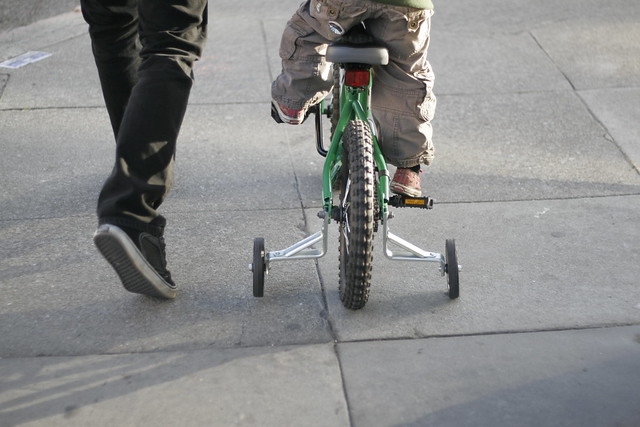
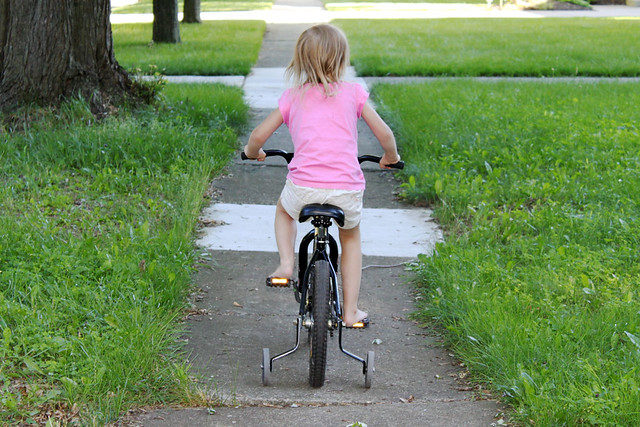
Most, if not all, of us can ride a bike. Many of us learned to pedal with a tricycle. Many of us moved to a 'big kid bike' by first using training wheels.

Three wheels in the back added stability, which bred confidence. Eventually the grownup who was walking with us gave us a push and then they were no longer needed. We could ride a bike.

I chose these images because learning to ride a bike is a big deal and it is an illustration nearly all kids can relate to. I do lots of talking about learning to ride a bike as we launch our memoir unit.

These images could be used to get kids thinking about their memories and experiences. Simply putting the photos before my students would get them talking. Talking is a fabulous pre-writing activity. Before they realize it I have gotten them from gabbing with their neighbor to pushing lead through their notebooks, where the work of the writer continues.

Another reason I chose these two images is because they are too centered. As we take our memoirs into digital storytelling we could revisit these images and talk about the rule of thirds.

How could they improve the composition of these photos? What is gained and lost by each change? Could they take a better one themselves? How will this knowledge impact their storyboarding? What else do they wonder about?

Sunday, May 13, 2012

Not Your Typical A.U.P.


Some rights reserved by YellowFilter

Collaborative, reflective projects are things I enjoy. They provide the opportunity to look at how and why things are done and then step back to see what would work best for a given situation. COETAIL Course Two gave me the chance to look at our Acceptable Use Policy as well as those for other schools.

Things I noticed while looking at A.U.P.s for both international schools and schools in the States…

  • sometimes they are broken down by grade level – ECE, primary, upper grades, MS, and HS
  • some appear outdated referencing things like digital bulletin boards
  • some are very negative – all “Do Not”
  • some pose things in a positive light – “I will…”
  • many are very long

I worked with two other teachers (both at the same school), sharing some examples I had found and reading through their draft. My biggest suggestion to them was to rephrase their policy into positive language, which they did. (I am not naming them because they don't know what is coming next and may not want to have anything to do with what I am about to say.)

After all of this reading and reflecting, collaborating and sharing, something wasn't sitting right with me. I couldn't put my finger on it. Then I was on a COETAIL, Big Marker, 'conference call' in which Jeff Utecht made a comment about how nice it would be if the A.U.P. just said, "Do No Harm".

Wow!

My brain has been churning on it ever since. That is exactly the kind of A.U.P. I envision. I have sat down several times to finalize my proposed A.U.P. and write this post, but it doesn't make sense to me.

  • Why can't it be about making good choices?
  • Why do we have to spell out what all of the possible choices are?
  • Aren't we trying to encourage thinking?
  • Don't we want students to have to think through their actions before they act?
  • What if some new technology appears during the school year that isn't covered by the A.U.P.?

So, if anyone wants to use it, here is my proposed A.U.P. (I am sending this link to my new principal.)

Make Good Choices.
(Consequences available for poor ones.)

Sunday, April 29, 2012

Jump to Hyperlink

Some rights reserved by uncleboatshoes
My personal use of hyperlinks has drastically increased over the past 8 months since I started this blog. 
I have kept a personal / family blog of photos since we moved overseas.
That blog has been pretty straight forward. (Sorry, you don't get the link.)
I post pictures.
People look at them.
Period.

CIMG1600 Some rights reserved by Kristi Lonheim
When I was contemplating creating my own blog (other than pictures) I started paying more attention to the blogs I was reading. I began to realize that blogging has its own formatting 'rules'.  Hyperlinks are a part of this.
I noticed that people were linking to sources whenever they could.
I observed people sharing related conversations to enlarge the discussion.
I appreciated bloggers who took the time to link to Amazon for books.
I found communities that regularly shared with one another.

I spent time lurking. (I'll admit there are still a couple blogs upon which I only lurk.) Once I made the jump to writing my own blog I took on the responsibility of sharing my sources, joining conversations, and linking ideas with hyperlinks being a primary avenue.
Some rights reserved by lufcwls
A few years ago I started sending out our yearly letter only via email. (It is not a Christmas letter, rather an Easter letter. Long story that would be a huge tangent here.) This year I hyperlinked my letter. Why not? I was able to link to photos, blog posts where I further flushed out my thinking, or additional information. Why bog down the letter turning it in to pages, but also why not offer the information for those that were interested?
Through COETAIL courses I have learned more about embedding items within my blog and am now comfortable messing with simple HTML code. I have added video and Google Docs (including scroll bars). I think about the easiest way for the viewer, the person I am sharing with, to access the information I want to share. This pondering takes into account both layout and the size of files. (Perhaps next year's letter will be subjected to videos of my daughter.)
What is the point of hyperlinks? I believe it to be two-fold. One is to give attribution. I need to be pointing back to the places I get my information, ideas, images, etc. The other point is connection. Part of the blogging world is about building community. By linking, the conversation and community can grow.
I think I have made the jump to hyper speed hyperlink. Are you with me?
Some rights reserved by George

Note added:
I published this post and headed to bed only to realize the irony of spending the evening contemplating hyperlinks and then forgetting to publish my weekly "Inspired to Link". This is another way links have become part of my life. There are so many ideas I am compelled by throughout the week, but not necessarily writing about. I started my Sunday, "Inspired to Link" as a way to share some of the things I come across and allow them to inspire you as well.

Friday, April 27, 2012

Define "Bullying"

Some rights reserved by crdotx

Danah Boyd's article, "Bullying" Has Little Resonance with Teenagers, really hit home with me. She points out that students often don't think of the situations they are experiencing around them as "bullying". The term reminds them of elementary school and the kids who gets picked on just because they are different. It becomes a question of semantics. If kids don't relate to the word 'bullying' then why are we using it?

The CyberSmart! curriculum has many well laid out lessons, but if we are not talking the same language are we really teaching our students anything. Especially in the realm of Digital Citizenship, if it isn't relevant to their lives students students are not going to engage with the material. Sure, they might complete the tasks we ask for, but it is simply busy work for them. We must find a way to connect with our students and help them deal with the issues they are actually facing.

Our students text. Our students chat. Many of our students (even the under 13s) have FaceBook accounts. What are we doing to help them learn to navigate these parts of their lives successfully?

Some rights reserved by alex.ragone

Tara Parker-Pope wrote about the struggle in her own family in the article, "When Dad Banned Text Messaging". She points out that, though she wondered about the meaningfulness of her daughter's 100 texts per day it was the messages her daughter received that stopped her in her tracks.

"That’s when I learned about the mean-girl texts, the ones no one would have the nerve to say to a person’s face but are easy to send from one nonconfrontational phone to another."

So, we don't call it 'bullying'. Perhaps we don't even name it. We explain situations and ask students if they can relate to what we are describing. I guarantee you they have either been directly involved or on the fringe of a conversation that has occurred because someone was mean to someone else via cyberspace.

Once we have shown students that we understand their world they will be more likely to hear what we have to say. Just as we had to teach them, when they were younger, to go directly to the person (taking an adult when needed), to use "I" statements, and to realize that they don't have to be friends with everyone, but they do have to show respect for everyone, we now have to transfer these lessons to their digital interactions.

Are we taking our role seriously?

Wednesday, April 11, 2012

Internet Presence

The biggest question I have pondered regarding one's internet presence is in regards to having a digital footprint. Should we have one?
That isn't really the question. You have one. The real question is how much control do you choose to have over it. This is something I spent a good chunk of time wrestling with and wrote about here.

My conclusion? A positive digital footprint is a good thing.

small_6617077543

If it is good for us, why not for kids?

In an article out of Educational Leadership titled Positive Digital Footprints William M. Ferriter says,

While schools are teaching students to worry about the consequences of being found online, (Will) Richardson is worried about the consequences for kids who can't be found online.

He is not saying open the flood gates and encourage students to do anything they want online. Rather it is our responsibility to show them where the pitfalls may be. Then, once students have a firm understanding about the good, the bad, and the ugly, we need to encourage them to start their online presence so they can begin to establish their own positive digital footprint.

Lisa Nielsen's take can be found in her post Why I Let My Kids Have an Internet Presence. She says,

The way I see it, there is risk in everything we do. We put our kids on school buses every day without seat belts.

So why not a digital presence? She even lets her own children, "first and last name and everything".

small_4073991160

Digital Footprint? Yes, heard of it. Digital Shadow? Now that is a new one. (A dark thing? Like in A Wrinkle In Time?) Sarah Perez in Calculate Your "Digital Footprint" with New Tool from EMC says that a digital shadow is all of your digital information generated about you. This information is generally passive, as opposed to your digital footprint that you play a direct role in putting on the web.

Your shadow includes things like images of you on a surveillance camera, your bank records, your retail and airline purchase records, your telephone records, your medical database entries, copies of hospital scans, information about your web searches, general backup data, information about credit card purchases, etc.

Not the kind of information you want broadcast to the world. So now that I have come to embrace my digital footprint it is time to wrestle with my digital shadow. How do you feel about your shadow?


Thumbs up photo: photo credit: <a href="http://www.flickr.com/photos/47749773@N04/6617077543/">briannaknt</a> via <a href="http://photopin.com">photopin</a> <a href="http://creativecommons.org/licenses/by-nc-sa/2.0/">cc</a>

Shadow photo: photo credit: <a href="http://www.flickr.com/photos/cameliatwu/4073991160/">CameliaTWU</a> via <a href="http://photopin.com">photopin</a> <a href="http://creativecommons.org/licenses/by-nc-nd/2.0/">cc</a>

Sunday, March 18, 2012

Inspired to Slice about COETAIL

This post is going multi-purpose.

square_3470183543_linkedIt is Sunday, so this is my "Inspired to Link" day. Right now all I am inspired to do is go to bed as it is way past my bed time. I could have you follow the link over to my course site, but for simplicity I will repost it here. (Does it still count as a link? I know I am stretching it.)

March SOLCSlice of Life? Right now I have thrilled to say I have completed my COETAIL Course 1. For a slice of my life, here is my final project…

I chose a unit that is yet to come this year. I suspect as I mull this over between now and May I will probably make some adjustments, but for the mean time this is what I know…

After Spring Break we launch into an American Revolution unit. I actually have to start with some Colonial Times background knowledge lessons in order for aspects of the American Revolution to make sense. This all culminates at the end of May with a Living Museum.

IMGP7404 IMG_0434

In order to prepare for the Living Museum students will research about a person for the American Revolution. (They are given a list of figures - anyone that they would be able to find enough information to do an acceptable job - and get to tell me their first, second, and third choices. No promises are made, but I try very hard to give each student someone they have selected.) Students use both print resources and online information to gather the needed materials. They practice their note taking skills, paraphrasing and summarizing as they go. The next step is to prepare a speech. This is written in Google Docs, which allows for comments from both myself and their peers during the writing process. Costumes are created and the speech is memorized in preparation for the actual Living Museum.

The presentation of their speeches happens in two different settings. Each student receives a note taking booklet as we have an in class session. This is where each speech is given while the rest of the students take notes I am filling out the rubric. Finally we move to a larger space and setup our actual 'museum' where the rest of the fifth graders and parents are invited to come and hear speeches as the historical figures come alive.

The other aspect of this project is a Prezi. This allows students to incorporate visual elements about their American Revolution figure. It serves as a preview or teaser before a figure 'comes to life' in the Living Museum. They are also available to share with a wider audience.

Those are my thoughts thus far.

Friday, March 9, 2012

Global Collaboration

small_5009895583_desks

What do two classrooms, 41 students spread out by 6 time zones have in common? We are finding out. Ms. Kim's class in Seoul, Korea and my class in Jeddah, Saudi Arabia are getting to know one another via Skype.

How did this arrangement start? Both of us teachers have blogs. We read and commented on one another's posts. Jee Young asked if I would be up for our classes connected. Of course I was.

So, we started a Google Doc and each added our students' questions. Even though my classroom has a good mix of diverse backgrounds it was interesting to see my students' cultural stereo types come out as they were coming up with questions for Ms. Kim's class. The first odd question caught me off guard, but then I realized I simply had to ask how they would ask a similar question and the students quickly realized strange their question sounded. Yes, there are differences and yes, it is OK to ask about them, but think it through first was the lesson that day.

We found a time that would work for both classes (the start of my day and the end of hers) and we were on our way. Our students have now talked twice and gotten the opportunity to ask and answer all of the questions. In our last conversation we found out they like K pop music, which we know nothing about. My students like Arab music, which they have never heard. Right now we are coming up with two videos to share in order to give the other class a taste of the music in our part of the world.

Where will we go from here? Her students are doing an American Revolution unit ahead of us so we will look to them to help us with our background knowledge. My students are completing their NESA Virtual Science Fair and will be able to help Ms. Kim's students focus their work when they start their Science Fair.

Anything else? We are talking about a book club, perhaps something like "Reading Across the Miles" where students in each class can read the same book and share in a virtual forum. We'll see!

After reading about the 1,001 Tales Projects I am wondering if we should give some collaborative writing a go as well.

It is a small world we live in. I am thankful for opportunities to allow my students further connections with people whose lives might be different from their own.


photo credit: <a href="http://www.flickr.com/photos/csessums/5009895583/">cdsessums</a> via <a href="http://photopin.com">photopin</a> <a href="http://creativecommons.org/licenses/by-sa/2.0/">cc</a>

Friday, March 2, 2012

New Things In New Ways

Shaping Tech for the Classroom by Marc Prensky delves into the paradigm shift that must take place if technology has any chance at transforming the learning environment. Simply having technology available does not mean learning has been impacted. Most often, simply having access to a computer gives us a new way to do the same things we have always done. Perhaps the task is done better, but has the essence of learning been changed?

Prensky says that technology adoption is a four step process.

  • Dabbling.
  • Doing old things in old ways.
  • Doing old things in new ways.
  • Doing new things in new ways.

It is not until we are willing to do new things in new ways that we will truly make inroads to changing what school looks like - truly have a positive influence on learning. A paradigm shift must take place. Simply adapting lessons to utilize technology won't do it.

Are there barriers to this paradigm shift? Loads of them. People are lazy. They like to do things the way they have always done them. Why spend so much effort to redo everything? Curriculum must be rewritten to embrace the use of technology - and mandate it where necessary. Teaching methods must be addressed and student assessments redesigned to reflect we are now asking students to do.

In Prensky's view one major hurdle is 1:1.

The missing technological element is true one-to-one computing, in which each student has a device he or she can work on, keep, customize, and take home. For true technological advance to occur, the computers must be personal to each learner. When used properly and well for education, these computers become extensions of the students' personal self and brain. They must have each student's stuff and each student's style all over them (in case you haven't noticed, kids love to customize and make technology personal), and that is something sharing just doesn't allow. Any ratio that involves sharing computers -- even two kids to a computer -- will delay the technology revolution from happening.

Making the jump is not easy. It involves infrastructure, methodology, mindset, and money. Is the pay off worth it? Absolutely. If we aren't willing to put in the work to make the shift we are no longer taking the best interest of our students into account. The world they live in involves some sort of device for nearly all aspects. If school is the place to prepare for the 'real world' don't we need to be replicating the real world?

An article by Jennie Magiera titled Redefining Instruction With Technology: Five Essential Steps explores her opportunity to use iPads in the classroom. In this reflection she realizes that simply inserting a device into her current practice was not successful. She had to make the paradigm shift. Are we willing to join her?

Saturday, February 18, 2012

Change

How are my thoughts changing? My thoughts have been preoccupied with notions of Unplugged. I know my thoughts will be changing plenty later this week as I am surrounded by people who share a goal of providing students with the technology skills they need through integrated lesson. I am sure I can't even imagine some of the changes that will happen within my own understanding of what 21st century schools and tech integration look like. I am anxious with anticipation.

One of the filters I will be taking things in through is that of Bloom's Digital Taxonomy Map. As Andrew Churches points out in his article, "Bloom's Taxonomy Blooms Digitally", our goal continues to be to push thinking to the higher rungs, but now we need to think about how to do that through a digital medium. I have printed out Bloom's Digital Taxonomy Map and have it inside my plan book. It is there, as a hard copy, to remind me to look at it often as I try to push myself and my students further up and further on.

Bloom'sDigitalTaxonomymap

I love the list of verbs on this map. Verbs are how we think about what we want students to be doing and this handy resource lets me think of the verb and then reference the map to see what rung that action applies to. Is there anyway I can incorporate rungs higher up the ladder in the same lesson? This is my goal. Yes, students still need to be able to understand, but remembering and understanding lessons are plentiful. Even finding ways to apply their learning are not atypical. How often am I encouraging them to analyze, evaluate, or create? That is the question I will be focusing on. How about you?